Free offline software for writing controlled SOPs
SOP Maker builds, numbers, authorises and prints Standard Operating Procedures. It runs entirely in your browser, saves into a folder you choose on your own computer, and sends nothing anywhere.
For any team that has to keep documented, auditable procedures — SOPs, work instructions, cleaning procedures and production instructions. It was built inside a food factory, where BRCGS and HACCP audits are unforgiving, which is why the document control is strict by default rather than optional.
Free, no sign-up. Authoring needs desktop Chrome or Edge.
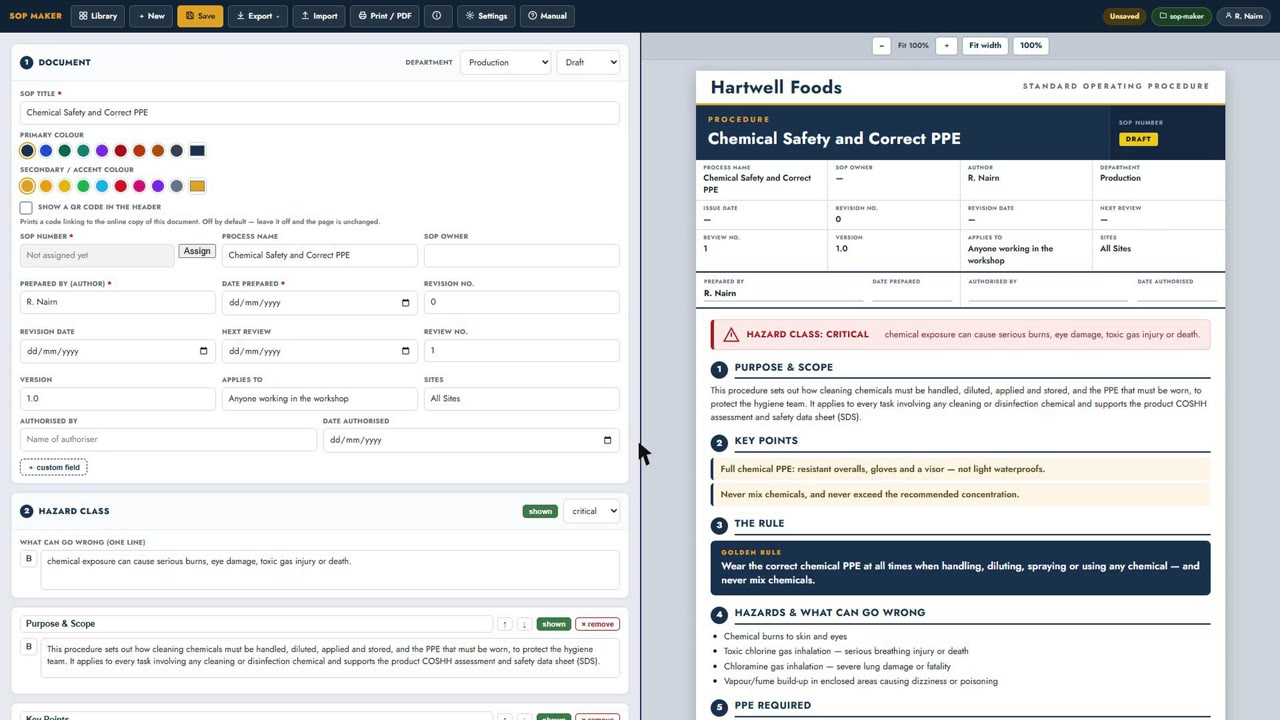
Watch it build a controlled SOP end to end — blank page to printed document. Opens YouTube in a new tab.
Nothing is uploaded. Your procedures are saved to a folder you pick. There is no server, no account, no analytics and no AI calls. Unlike hosted SOP platforms, SOP Maker has nothing to upload to — so no procedure ever leaves your network.
If your IT department needs the detail — what the tool accesses, every network request it makes and the headers it is served with — send them SOP Maker for IT.
What free software can I use to write SOPs?
SOP Maker is free software for writing Standard Operating Procedures. It costs nothing, needs no account and runs in your browser. It is free to use for anything, including commercial work, but it is not open source. It writes each SOP as a controlled document with a prepared-by, authorised-by, revision number and status, and prints to A4 PDF. Files are saved to a folder on your own computer, so no procedure leaves your network. Authoring needs desktop Chrome or Edge.
What should a standard operating procedure include?
A usable SOP carries six things: a unique document number, a title, who prepared it and who authorised it, a revision number and date, the steps themselves in order, and the PPE or controls needed before starting. Without the number and the authorisation it is a set of notes rather than a controlled document, and an auditor will treat it that way. SOP Maker builds all six into every document. There is a longer walk-through in how to write an SOP.
How do I write a cleaning procedure for a food factory?
Write it as a numbered sequence a cleaner can follow at 2am without asking anyone. State the chemical, its dilution and contact time; the PPE; how the machine is isolated; the order of dismantling; and how the result is checked. Add a photograph to any step where the wrong interpretation is plausible. SOP Maker ships 158 PPE, chemical-class and lock-off icons drawn for food sites, so those requirements appear as symbols rather than sentences.
What does SOP Maker do?
It builds a controlled document. Each SOP carries a document-control header — prepared by, authorised by, revision number, dates — and a status of Draft, Review or Approved. You can add PPE, tools and control icons, photographs with numbered steps, and step-by-step sections. Finished SOPs print to PDF with per-page footers and no rows split across a page break.
Document control
SOP numbers are issued per department and checked for duplicates across the whole folder before one is stamped on a document.
Print that behaves
A4 with per-page footers, repeating table headers, and no step split across a page break. Every release is measured on rendered paper, not assumed.
Icons that fit a factory
158 drawn icons — PPE, cleaning tools, controls, and chemical-class symbols, including the ones only food sites use.
Safe on a shared drive
Before saving, it checks whether someone else has changed the file, and keeps a backup of the version it is about to replace.
Which browsers does SOP Maker work in?
Authoring needs desktop Google Chrome or Microsoft Edge, because SOP Maker uses the File System Access API to write into your chosen folder. Firefox, Safari, phones and tablets can open and print an issued SOP but cannot create or save one.
Where is my SOP data stored?
In a folder you pick on your own computer or shared drive, plus a local copy in your browser. There is no server, no account, no analytics and no AI calls. Nothing you type is transmitted anywhere. The privacy policy sets out the only thing that is logged — ordinary web-server request logs when you load this page, and SOP Maker for IT covers the same ground in the detail an information security reviewer will want.
Is SOP Maker really free?
Yes. Free to use for anything, including commercial work, with no paid tier, no sign-up and no usage limit. It is not open source: the licence keeps the software and the icon set the author's, and everything you write with it stays yours.
Can two people work on the same SOP folder?
Yes, on a shared drive. Before writing, SOP Maker re-reads the file and compares it with the version you opened. If a colleague has saved in between, it stops and asks instead of quietly replacing their work, and it copies the version it is about to replace into a backup folder first, so an overwrite can be undone by hand. Each save is also recorded in a per-document history with the name of the person who made it.
One honest limit: if two people on two different computers press Save in the same instant, the check cannot see the other save in time and the later write wins. In that one case the backup does not hold the overwritten work either, because both computers read the same version before writing and both back that version up; the save history shows you it happened and who made both saves, but not the lost text. Within a single browser profile on one computer, saves are properly queued and cannot overlap; two browser profiles, or two different browsers, are separate scopes and behave like two computers.
Can I use it completely offline?
Yes. Download the toolkit — it contains the app, every PPE, tools and controls icon, the manual and an example SOP. Unzip it, open the app inside, then connect that folder. After that it never needs the internet again. If you use the hosted version at this address instead, it keeps working with the connection off once the page has loaded.
What SOP Maker does not do
No hosted accounts and no cloud sync. No approval-routing workflow and no electronic signatures. No training records or read-and-sign tracking. No authoring on phones or tablets, and no authoring in Firefox or Safari. No real-time co-editing — two people on a shared drive take turns, protected by the change check and the backup copy described above.
Who made SOP Maker?
Jakub Rimek, a web developer in Fife, Scotland, who builds hygiene and compliance tools for food manufacturing. SOP Maker came out of writing and controlling procedures for a working factory — chasing the current version of a procedure before an audit is a bad way to spend a week. More of his work is at rimek.uk.
Got an idea, or want the tool adapted to how your team works? Email jakub@rimek.uk.
More on writing procedures
- How to write a standard operating procedure — the seven things every SOP needs, in order.
- SOP software for food manufacturing — hygiene, cleaning and the paperwork an audit asks for.
- Free SOP templates — the shape each procedure type takes.
- SOP vs work instruction — and where production instructions sit.